Introduction
In the past couple of years, if you asked any cutting-edge developer what their most indispensable AI tool is, Cursor would definitely rank in the top three. It pioneered the concept of “Codebase-Aware” coding, pushing GitHub Copilot into a corner.
With the official launch of Cursor 3, this AI-native code editor has undergone a transformative change. If you are still using an older version of Cursor (or are accustomed to Composer 1.5 from the 2.x era), this upgrade will undoubtedly revolutionize your daily workflow.
As your AI partner, I understand the fatigue that comes with frequent tool updates and the feeling of having to relearn everything. But don’t worry, in this detailed article, I will guide you through all the core upgrades of Cursor 3 and clarify the differences from its predecessors (mainly 2.x and earlier versions).
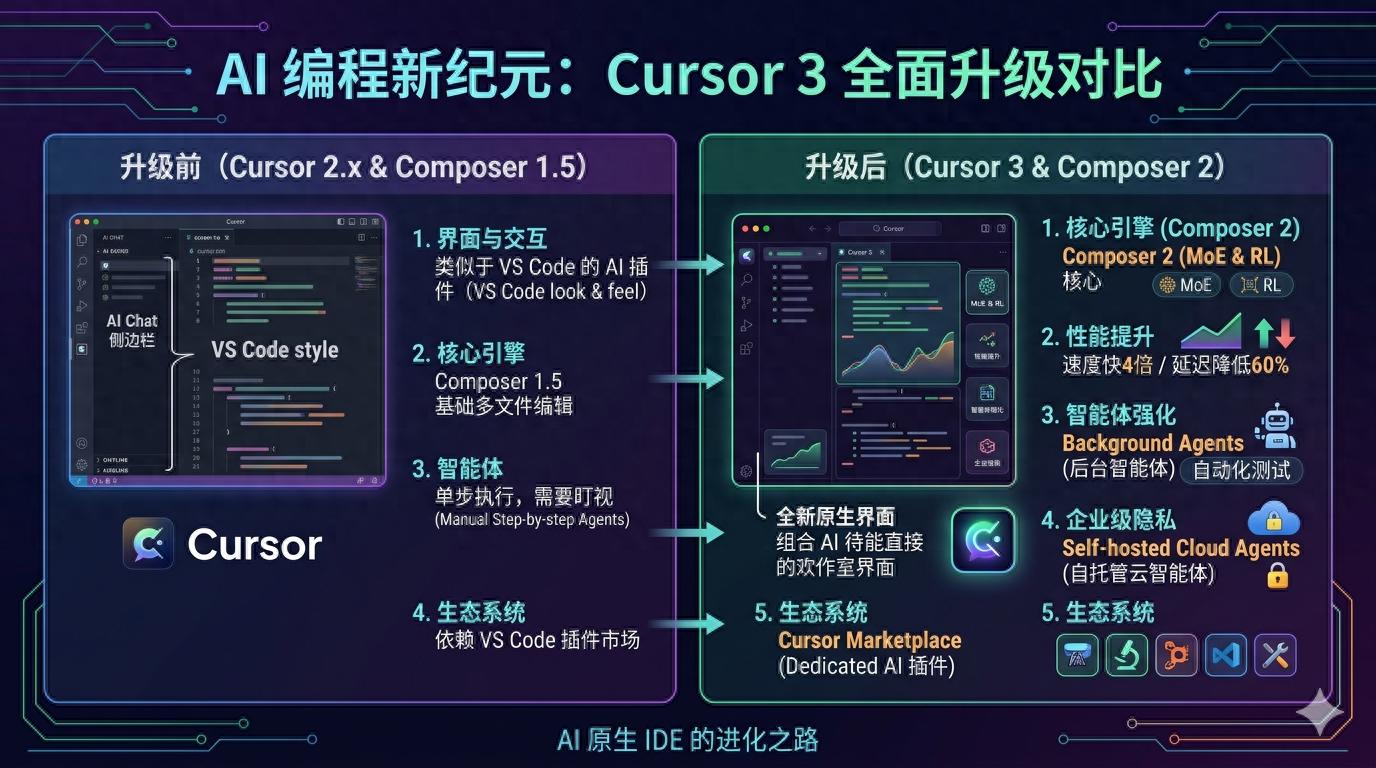
1. Interface and Interaction: From “VS Code AI Plugin” to “True AI Native IDE”
In the older versions, although Cursor was developed based on a fork of VS Code, it felt more like a “VS Code heavily armed with AI.” You could still see the strong influence of VS Code: the file tree on the left, code on the right, with the AI chat box and multi-file editing appearing as add-ons in the sidebar or floating windows.
In Cursor 3, the official launch of the New Cursor Interface has changed that.
- Immersive AI Integration: AI is no longer a sidebar that needs to be activated; it is fully integrated into the editor’s canvas. Interactions such as AI-generated code, diff comparisons, and error fixes are more natural, reducing the fatigue of switching your gaze between the code area and the AI dialog box.
- Spatial Layout Reconstruction: The floating window of the old Composer often obstructed the code, but in Cursor 3, the collaborative area for multi-file interaction has received better native layout support.
In simple terms, while the previous Cursor felt like a traditional car with a smart screen added, Cursor 3 resembles a native smart electric vehicle designed from the ground up.
2. Core Engine Evolution: From Composer 1.5 to Composer 2
One of the most addictive features of Cursor is undoubtedly Composer. You simply need to say in natural language, “Help me refactor the authentication logic to JWT and update all related routes and test files,” and it can simultaneously output changes across multiple files.
The Composer 1.5 used in older versions was already powerful, but it sometimes struggled in large projects or exhibited logical gaps in long contexts. The Composer 2, deeply integrated into Cursor 3, brings a qualitative leap:
- 4x Faster Generation Speed: Composer 2 employs a new Mixture of Experts (MoE) architecture and has undergone intensive reinforcement learning (RL) in software engineering. In practical experience, its code generation and cross-file modification speed are almost several times faster than its predecessor. Tasks that used to take dozens of seconds or even minutes for multi-file refactoring can now often be completed in the time it takes to sip a drink.
- 60% Reduction in Latency: The old version often lagged when processing large multi-file diffs, while the core algorithm optimization in version 2.0 has reduced interaction latency by over 60%, making it as smooth as pairing with a human programmer.
- Stronger Project-Level Intelligence: The previous Composer sometimes acted like a “submissive but clueless intern,” making changes wherever instructed, even if it led to errors elsewhere. Composer 2 possesses a stronger capability for “holistic review,” proactively using semantic search tools to sniff out potential dependency impacts in the project before making modifications.
3. Agent Evolution: From Step-by-Step Execution to “Fully Automated Worker”
In the older versions, while Cursor had preliminary agent capabilities (such as reading terminal errors and executing commands automatically), it often required you to monitor it closely.
Cursor 3 and its recent upgrades have pushed the concept of agents to a practical level:
1. Introduction of Background Agents
This is a killer feature that was absolutely absent in older versions. Previously, when Composer was helping you refactor a large amount of code, you could only sit and watch it modify files on the screen.
Now, you can assign tedious tasks (like “complete all unit tests for this new module”) to Background Agents. They will autonomously create new threads in a cloud sandbox to write, run tests, and iterate fixes based on errors. Meanwhile, you can continue typing your core business logic in the foreground, effectively gaining a junior developer substitute that works around the clock without a salary.
2. Self-hosted Cloud Agents
For many large companies or teams concerned about code privacy, the biggest headache with older versions was that “code had to be sent to third-party clouds.” Cursor 3 introduces support for self-hosted cloud agents, allowing enterprises to deploy these powerful agents on their private clouds or local servers. This ensures code confidentiality while still enjoying the seamless experience of AI running terminals and fixing bugs.
4. Plugin Ecosystem: From Riding Coattails to “Cursor Marketplace”
Before the upgrade, Cursor did not have its own independent ecosystem; it was entirely compatible with and reliant on Microsoft’s VS Code plugin market. While this ensured low migration costs, it also meant that many plugins could not deeply utilize Cursor’s unique AI interfaces.
Cursor 3 marks the independence of its ecosystem. The official launch of the Cursor Marketplace has occurred.
Now, developers can not only use the vast array of VS Code plugins but also download deeply customized plugins designed specifically for AI collaboration from Cursor’s dedicated marketplace. For example, smarter code review tools and architectural design templates that can be directly fed to Composer.
5. Model Support and Computational Logic Restructuring
If you have been using Cursor since 2024 or even earlier, you must have felt the changes in Cursor’s pricing and model strategy:
- Ultimate Multi-Model Mixing: In older versions, switching models was somewhat cumbersome. Cursor 3 has perfected multi-model support and seamlessly integrates the latest model tiers (such as Claude 3.5 Sonnet, GPT-5 series, or Gemini 3 Pro). You can configure freely: use model A, which excels in long contexts, for full project chat, and model B, which focuses on logical reasoning, to drive Composer 2.
- Comprehensive Establishment of Credit Pool System: The older versions (especially the early ones) often adopted a model of “fixed 500 high-level model requests per month,” which would downgrade or queue once used up. In later versions (continuing to Cursor 3), it has completely shifted to a billing system based on credit pools. While this may make some heavy users feel that it is “not as cost-effective as before,” it indeed supports explosive calls to more expensive and smarter flagship models to tackle challenges in a short time.
6. Core Differences at a Glance
To make the core differences before and after the upgrade clear, I have organized them into a table:
| Dimension | Before Upgrade (Cursor 2.x and earlier) | After Upgrade (Cursor 3.0 Era) |
|---|---|---|
| UI Interface | Similar to “VS Code + AI sidebar and floating windows” | Brand new native interface, AI interaction deeply integrated with the editor canvas |
| Composer Capability | Version 1.5, multi-file editing was in its infancy, but sometimes lagged | Composer 2 arrives, based on RL reinforcement learning, speed increased 4 times |
| Agent | Basic mode, requires user to monitor and confirm | Introduced Background Agents for asynchronous background work; supports Self-hosted Cloud Agents |
| Ecosystem | Completely dependent on VS Code plugin market | Launched independent Cursor Marketplace, with a dedicated AI plugin ecosystem |
| Multi-file Diff Latency | Slow when handling large projects, often experiences noticeable waiting | Latency reduced by 60%, nearly instantaneous processing |
7. Conclusion: How Should We Approach This Upgrade?
Overall, Cursor 3 is not just a simple “skin-deep” upgrade; it is a milestone that completely frees itself from the shadow of VS Code, moving towards a fully “AI Native Independent IDE”.
- If you are a personal developer or independent creator: Upgrade without hesitation! Composer 2 and background agents can enable you to operate like a full team on your own.
- If you are a team leader: The addition of self-hosted cloud agents finally clears a significant portion of compliance and privacy barriers for large-scale internal deployment of Cursor.
Of course, no matter how powerful an AI tool is, it is merely a magnifying glass that amplifies your architectural capabilities and logical thinking as an engineer. The faster the tool, the more we need to maintain a vigilant code review habit.
Comments
Discussion is powered by Giscus (GitHub Discussions). Add
repo,repoID,category, andcategoryIDunder[params.comments.giscus]inhugo.tomlusing the values from the Giscus setup tool.